Windows 10 & 11 · one-time purchase

Translate anything on your screen, right where you are reading it.

Orbonis lets you select any region of your Windows screen, recognise the text inside it, and read the translation directly over the original content. Useful for websites, PDFs, desktop apps, video, games, comics and images that cannot be copied.

OrbonisInstaller.exe · 10.3 MB · v1.0.0See pricing and licensing

A license key is required to activate the application. OCR can run locally; if you select an online translation provider, the recognised text is sent to that provider.
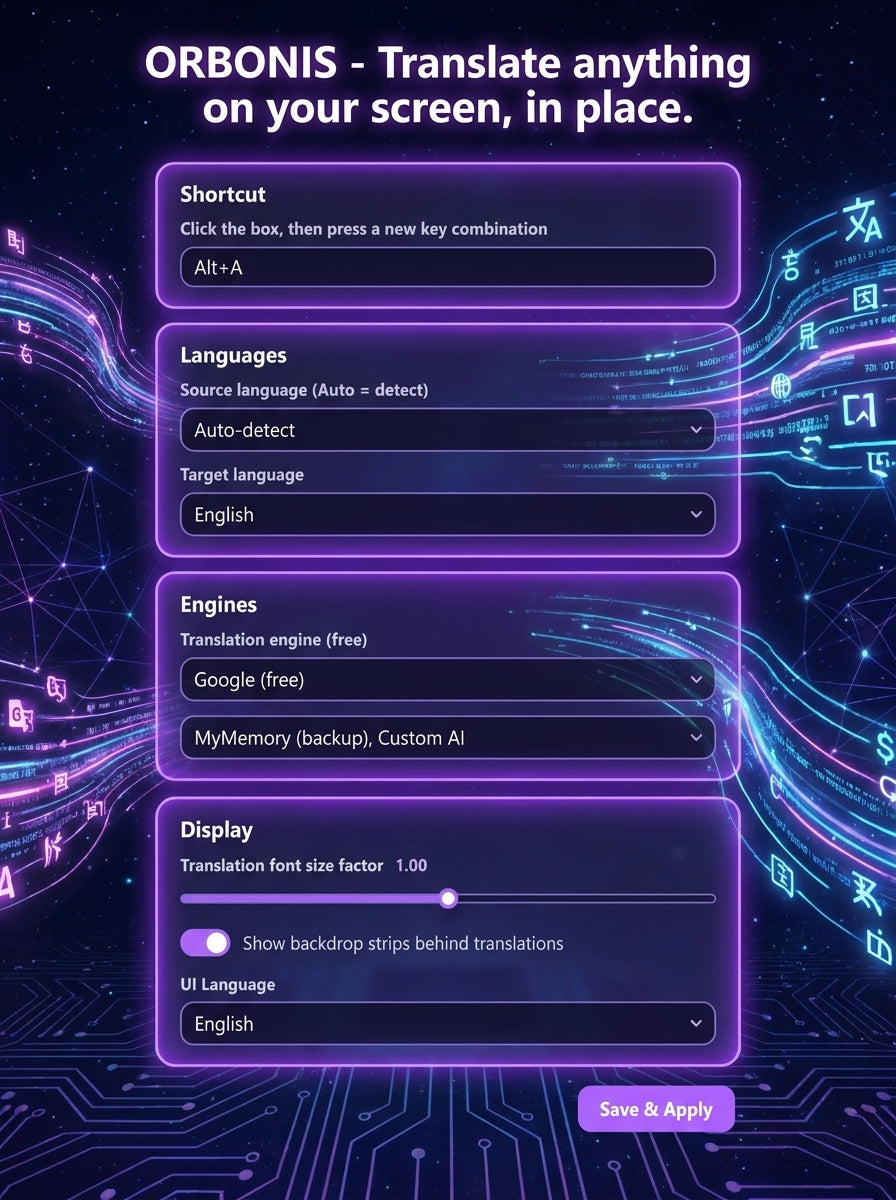
Orbonis settings window showing shortcut, language, engine and display options
Orbonis settings: shortcut, languages, engines and display options.

How it works

Four steps, a couple of seconds

Orbonis is deliberately shallow: there is nothing to import, no account to create and no document to convert.

  1. 01

    Press your shortcut

    Orbonis waits in the tray. One keyboard shortcut — one you choose yourself — puts it into capture mode.

  2. 02

    Draw around the text

    Drag a box over the part of the screen you want to read: a paragraph, a menu, a subtitle, a speech bubble.

  3. 03

    Text is recognised

    OCR can run locally on your computer to turn the pixels inside that region into text.

  4. 04

    Read it in place

    The translation appears over the original area, so you keep your place in the page instead of switching windows.

Why people use it

A small utility that removes a specific daily friction

Orbonis does one job. The design choices below are all in service of that job.

  • Works where copying does not

    Scanned PDFs, canvas-rendered apps, games, video frames, image files and locked documents all become readable because Orbonis reads pixels, not the clipboard.

  • Recognition on your machine

    Multiple OCR engines are available and can run locally, so the recognition step does not require uploading your screen region.

  • Your own AI, if you want it

    Point Orbonis at any OpenAI-compatible endpoint with your own model name and API key, and it will translate through that service.

  • Providers you choose

    Switch between several translation providers depending on the language pair, the content and how you feel about sending text online.

  • Small and quiet

    It stays in the tray, does not nag, shows no advertising, and only appears when you press the shortcut.

  • One-time purchase

    $4.99 once for a personal-use license. No subscription and no recurring charge.

Realistic use cases

Where a screen translator actually helps

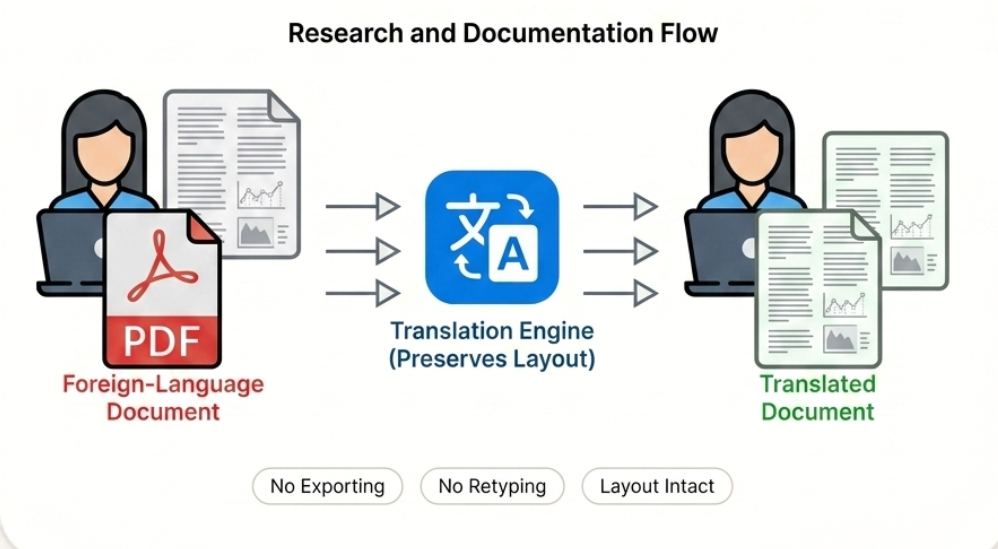
Research and documentation flow: foreign-language PDF in, translated document out, preserving layout without exporting or retyping
PDFs & manuals

Research and documentation

Read a foreign-language datasheet, standard or scanned report without exporting it, retyping paragraphs or losing the layout you were following.

Hands holding a game controller in front of a monitor showing a fantasy game menu at night
Games & desktop apps

Games and applications

Understand quest text, item descriptions and settings dialogs in software that was never translated, without leaving fullscreen for a browser tab.
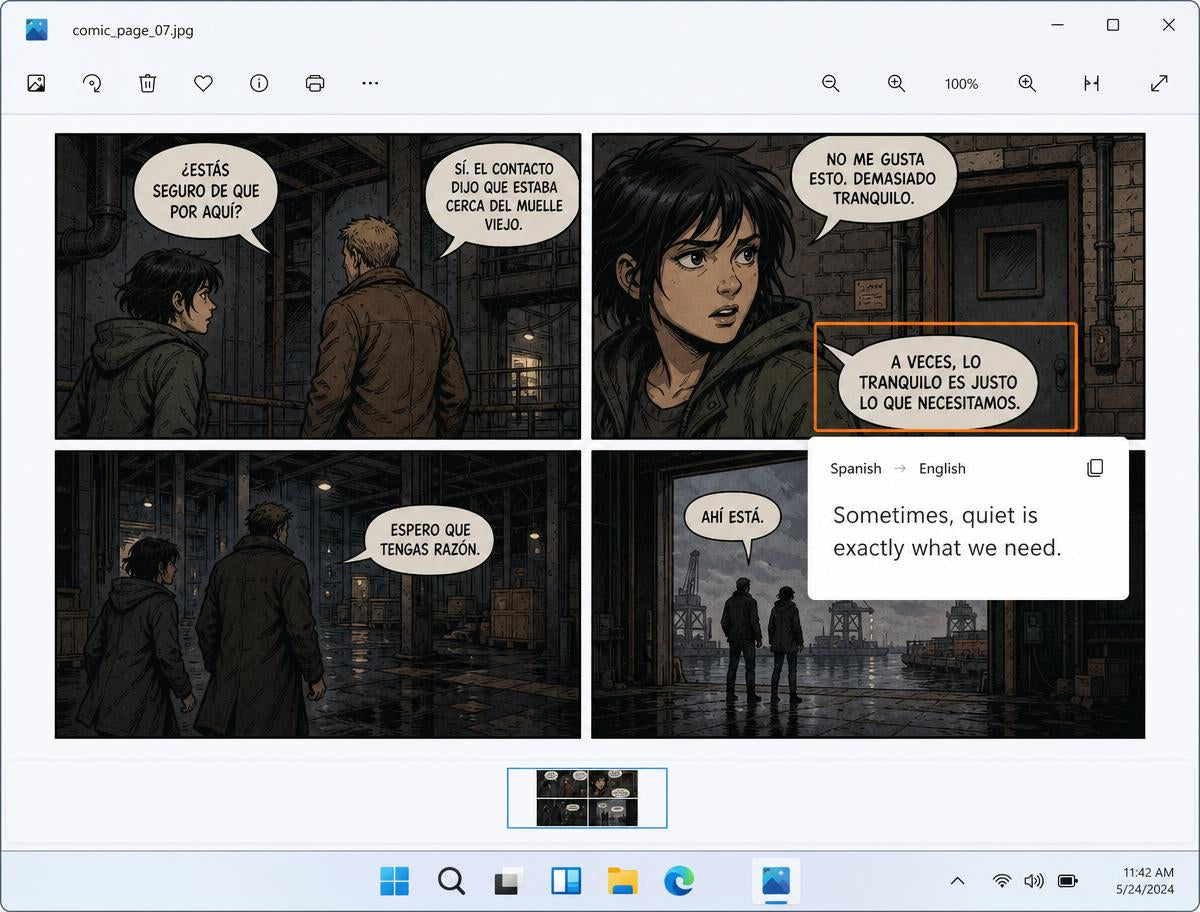
A comic page in a Windows image viewer with one speech bubble highlighted and its English translation shown beside it
Images & video frames

Comics, images and video

Select one panel, one caption or one paused subtitle frame and read it immediately — no transcription, no separate translation tab.

Honest about the data path

Recognition can stay local. Translation depends on your provider.

We would rather be precise than sell you a promise we cannot keep.

  • Local OCR. The bundled OCR engines can run on your own computer, so the captured region does not have to leave your machine to be recognised.
  • Online providers. If you choose an online translation provider, the recognised text and your language settings are sent to that provider so it can translate. Their terms then apply.
  • Settings stay on your PC. Your preferences and any API credentials you enter are stored in the application's local settings on your computer.

Custom AI endpoint

Bring your own OpenAI-compatible API

If you already pay for an AI service — or run one yourself — Orbonis can use it for translation instead of a built-in provider. You control the endpoint, the model and the key.

Endpoint
https://your-provider.example/v1
Model
your-model-name
API key
sk-•••••••••••••••••

Fields shown for illustration. A key is only needed for providers that require one, and Orbonis never asks you to send it to us.

Compatibility

Built for Windows, and only Windows

Orbonis is a native C# / WPF desktop application. There is no macOS, Linux or mobile version, and we will not pretend otherwise.

Operating system
Windows 10 and Windows 11 (64-bit)
Installer
OrbonisInstaller.exe · 10.3 MB
Current version
v1.0.0 (August 2026)
Activation
License key required
A translated speech bubble shown over a comic page inside a Windows image viewer
Orbonis translating text directly over a selected screen region.

Pricing

Two products, both one-time payments

Most people only need the first one. The source package exists for developers who want the code.

For everyday users

Orbonis for Windows

A personal-use license for the Orbonis screen translation app, plus the lightweight Windows installer.

$4.99USD

One-time purchase · no subscription

  • Personal-use license key for Orbonis
  • Lightweight Windows installer that fetches the full application
  • All current features, including custom AI endpoints
  • Free updates within the current major version
  • Email support at info@orbonis.shop

For developers

Orbonis Source Package

The complete C# / WPF source package for Orbonis, for developers who want to study, modify or build their own version.

$49.99USD

One-time purchase · no subscription

  • Complete C# / WPF Visual Studio solution
  • Screen-region capture and overlay rendering code
  • OCR engine integration layer
  • Translation provider abstraction, including OpenAI-compatible endpoints
  • Build notes for producing your own private build

Prices in USD. Digital delivery by email. Refund Policy and License Agreement apply.

Questions

The things people ask first

All questions
What can Orbonis translate?
Anything visible on your screen: web pages, PDF documents, desktop applications, paused video frames, games, comics, screenshots and images. Because Orbonis reads pixels rather than copying text, it also works where selection is blocked.
Which versions of Windows are supported?
Windows 10 and Windows 11 (64-bit). There is no macOS, Linux, iOS or Android version.
Does OCR run locally?
Yes — text recognition can run on your own computer using the bundled OCR engines, so the captured region does not have to be uploaded for the recognition step.
Does translation need an internet connection?
It depends on the provider you choose. Online translation providers and AI endpoints require a connection. Recognition itself can run locally.
What does an online translation provider receive?
When you select an online provider, the text recognised from your selected region is sent to that provider so it can be translated, together with your language settings. Their own privacy terms then apply. Orbonis is not offline end to end when an online provider is selected.
How do custom AI endpoints work?
Orbonis can talk to any OpenAI-compatible API. You enter the endpoint URL, the model name and your API key, and Orbonis uses that service for translation instead of a built-in provider.

Stop retyping text you can already see

Download the installer, activate your license, and translate the next thing on your screen in a couple of seconds.

Already purchased? Retrieve your license